Showing posts with label Java. Show all posts

13 July 2014

KeyListener example in java

KeyListener Example


/*
*its the first class
*save is as Car.java
/*
import java.awt.Color;
import java.awt.Graphics2D;
import java.awt.event.KeyEvent;

public class Car {

static int CARWIDTH = 40;
static int CARLENGTH = 70;
int x = Game.WIDTH/2 - CARWIDTH/2;
int y = Game.HEIGHT - 105;
int dx = 0;
int dy = 0;
private Game game;

public Car(Game game){
this.game = game;
}

public void paint(Graphics2D g2d){
g2d.setColor(Color.blue);
g2d.fillRect(x, y, CARWIDTH, CARLENGTH);
}

public void move(){

if(x+dx > 0 && x+dx < Game.WIDTH-56) x = x+dx;
if(y+dy > 0 && y+dy < Game.HEIGHT-105) y = y+dy;

}

public void keyPressed(KeyEvent e){
if(e.getKeyCode() == KeyEvent.VK_LEFT) dx = -1;
if(e.getKeyCode() == KeyEvent.VK_RIGHT) dx = 1;
if(e.getKeyCode() == KeyEvent.VK_UP) dy = -1;
if(e.getKeyCode() == KeyEvent.VK_DOWN) dy = 1;
}

public void keyReleased(){
dx = 0;
dy = 0;
}

}
//////////////EnD of First Class////////////////

/*
*its the SECOND class
*save is as Game.java
/*


import java.awt.Color;
import java.awt.Graphics;
import java.awt.Graphics2D;
import java.awt.RenderingHints;
import java.awt.event.KeyEvent;
import java.awt.event.KeyListener;

import javax.swing.JFrame;
import javax.swing.JPanel;

@SuppressWarnings("serial")
public class Game extends JPanel{

static int WIDTH = 500;
static int HEIGHT = 700;
Car car = new Car(this);


public Game(){
addKeyListener(new KeyListener() {

@Override
public void keyTyped(KeyEvent e) {
// TODO Auto-generated method stub

}

@Override
public void keyReleased(KeyEvent e) {
car.keyReleased();

}

@Override
public void keyPressed(KeyEvent e) {
car.keyPressed(e);

}
});
setFocusable(true);
}

private void move(){
car.move();
}

public void paint(Graphics g) {
super.paint(g);
Graphics2D g2d = (Graphics2D)g;
g2d.setRenderingHint(RenderingHints.KEY_ANTIALIASING,
RenderingHints.VALUE_ANTIALIAS_ON);
car.paint(g2d);
}


public static void main(String args[]) throws InterruptedException{
Game game = new Game();
JFrame frame = new JFrame("Car Game");
frame.add(game);
frame.getContentPane().setBackground(Color.white);
frame.setSize(WIDTH, HEIGHT);
frame.setVisible(true);
frame.setDefaultCloseOperation(JFrame.EXIT_ON_CLOSE);


while(true){
game.move();
game.repaint();
Thread.sleep(1);
}
}


}
////////////////////EnD of Second Class////////////////////////////

How to paddle in brick breaker

Simple Paddle in Brick Breaker


Code for simple paddle in java brick breaker game

import java.awt.Color;
import java.awt.Graphics;
import java.awt.event.KeyAdapter;
import java.awt.event.KeyEvent;

import javax.swing.JFrame;
import javax.swing.JPanel;

import test1.BallBreaker;


public class Bat extends JPanel{


private int x = 140;

private int y = 240;

int width = 30;

int height = 10;
public Bat(){
addKeyListener(new KeyAdapter() {
@Override
public void keyPressed(KeyEvent evt) {
moveIt(evt);
}
});
setFocusable(true);
}

public void paint(Graphics g)
{
/*
*
* As we are extending JPanel,
* we need to paint background with some color first
* Note: if we extend Canvas class than we need not
* paint back ground. we can directly draw peddle
*/
g.setColor(Color.LIGHT_GRAY);//paint background with light gray
g.fillRect(0, 0, 350, 450);//screen dimensions
g.setColor(Color.blue);//change color value from gray to blue
g.drawRect(x, y, width, height);
g.fillRect(x, y, width, height);//fill blue color to paddle

/*
* you can uncomment below two lines to see styles of peddle
*/
// g.fill3DRect(x, y+40, width, height, false);

// g.fill3DRect(x, y+80, width, height, true);
}
protected void moveIt(KeyEvent evt) {////finds which key is pressed eighter left of right
if (x < 3) {
x = 3;
} else if (x > 290) {
x = 290;
}

switch (evt.getKeyCode()) {
case KeyEvent.VK_LEFT:
x -= 5;
break;
case KeyEvent.VK_RIGHT:
x += 5;
break;
}

repaint();
}

//public int getX() {
// return x;
//}
//
//public void setX(int x) {
// this.x = x;
//}
//
//public int getY() {
// return y;
//}
//
//public void setY(int y) {
// this.y = y;
//}

public static void main(String[] args) {
Bat bat = new Bat();
JFrame jf = new JFrame("game");
jf.add(bat);
jf.setSize(350,450);
jf.setVisible(true);
jf.setDefaultCloseOperation(JFrame.EXIT_ON_CLOSE);


}


}

25 April 2014

draw text in canvas using edittext

draw text in canvas using edittext

activity_main.xml

<RelativeLayout xmlns:android="http://schemas.android.com/apk/res/android"
    xmlns:tools="http://schemas.android.com/tools"
    android:layout_width="match_parent"
    android:layout_height="match_parent"
    android:paddingLeft="@dimen/activity_horizontal_margin"
    android:paddingRight="@dimen/activity_horizontal_margin"
    android:paddingTop="@dimen/activity_vertical_margin"
    android:paddingBottom="@dimen/activity_vertical_margin"
    tools:context="packagename.MainActivity">

<intraction.arrow.app.DrawView
    android:id="@+id/drawView"
    android:layout_width="fill_parent"
    android:layout_height="200dp" />

    <EditText
        android:layout_width="match_parent"
        android:layout_height="wrap_content"
        android:id="@+id/editText"
        android:hint="Enter your Text"
        android:focusable="true"
        android:layout_below="@+id/drawView"
        android:layout_alignParentRight="true"
        android:layout_alignParentEnd="true" />

    <Button
        android:layout_width="wrap_content"
        android:layout_height="wrap_content"
        android:text="Save Image"
        android:id="@+id/button"
        android:layout_below="@+id/editText"
        android:layout_alignParentLeft="true"
        android:layout_alignParentStart="true" />


</RelativeLayout>


MainActivity.java

package packagename;


import android.support.v7.app.ActionBarActivity;
import android.os.Bundle;
import android.text.Editable;
import android.text.TextWatcher;

import android.view.Menu;
import android.view.MenuItem;
import android.view.View;
import android.widget.Button;
import android.widget.EditText;


public class MainActivity extends ActionBarActivity {

    Communicator communicator;
//ListView listView;
    EditText editText;
    Button saveButton;
    @Override
    protected void onCreate(Bundle savedInstanceState) {
        super.onCreate(savedInstanceState);
        setContentView(R.layout.activity_main);
        //listView = (ListView) findViewById(R.id.listView);
        //NetworkConfig config = new NetworkConfig("http://arrowgifts.com/mobile/mobile_home");

        //drawView = new DrawView(this);
        //drawView = (DrawView) findViewById(R.id.drawView);
        communicator = (Communicator)findViewById(R.id.drawView);
        //setContentView(drawView);
       // save();
        saveButton = (Button) findViewById(R.id.button);
        saveButton.setOnClickListener(new View.OnClickListener() {
            @Override
            public void onClick(View view) {
                communicator.saveImage();
            }
        });
        editText = (EditText) findViewById(R.id.editText);
editText.addTextChangedListener( new TextWatcher() {
    @Override
    public void beforeTextChanged(CharSequence charSequence, int i, int i2, int i3) {

    }

    @Override
    public void onTextChanged(CharSequence charSequence, int i, int i2, int i3) {
communicator.writeText(editText.getText().toString());
    }

    @Override
    public void afterTextChanged(Editable editable) {

    }
});
    }


    @Override
    public boolean onCreateOptionsMenu(Menu menu) {
     
        // Inflate the menu; this adds items to the action bar if it is present.
        getMenuInflater().inflate(R.menu.main, menu);
        return true;
    }

    @Override
    public boolean onOptionsItemSelected(MenuItem item) {
        // Handle action bar item clicks here. The action bar will
        // automatically handle clicks on the Home/Up button, so long
        // as you specify a parent activity in AndroidManifest.xml.
        int id = item.getItemId();
        if (id == R.id.action_settings) {
            return true;
        }
        return super.onOptionsItemSelected(item);
    }

/**
 * Communicator
 * **/
public interface Communicator{
    public void writeText(String string);
    public void saveImage();
}


}
//...................................\\


DrawView.java

package packagename;


import android.content.Context;
import android.graphics.Bitmap;
import android.graphics.BitmapFactory;
import android.graphics.Canvas;
import android.graphics.Color;
import android.graphics.Paint;


import android.util.AttributeSet;

import android.view.View;


/**
 * Created by sravan on 4/22/2014.
 */
public class DrawView extends View implements MainActivity.Communicator {
    Bitmap bitmap;
Bitmap newBitmap;

//        public DrawView(Context context) {
//            this(context,null);
//        bitmap = BitmapFactory.decodeResource(getResources(), R.drawable.templer);
//        newBitmap = Bitmap.createBitmap(bitmap,0,0,bitmap.getWidth()-100,bitmap.getHeight()-100);
//
//
//    }

    public DrawView(Context context, AttributeSet attrs) {

        super(context, attrs);
        bitmap = BitmapFactory.decodeResource(getResources(), R.drawable.templer);
        newBitmap = Bitmap.createBitmap(bitmap,0,0,bitmap.getWidth()-100,bitmap.getHeight()-100);
    }

//    public DrawView(Context context, AttributeSet attrs, int defStyleAttr) {
//        super(context, attrs, defStyleAttr);
//    }


    @Override
    protected void onDraw(Canvas canvas) {

        super.onDraw(canvas);
        Paint paint = new Paint(Paint.ANTI_ALIAS_FLAG);
        paint.setColor(Color.RED);
        paint.setTextSize(50);
        paint.setStyle(Paint.Style.FILL);


        canvas.drawBitmap(newBitmap, 0, 0, null);

        canvas.drawText(textToBeWritten, 10, 50, paint);
        setDrawingCacheEnabled(true);

    }

private String textToBeWritten ="Enter Text" ;
    @Override
    public void writeText(String string) {
        textToBeWritten = string;
        invalidate();
    }

    @Override
    public void saveImage() {
        SaveFile saveFile = new SaveFile();
        saveFile.save(getDrawingCache());
    }
}


SaveFile.java


package packagename;

import android.graphics.Bitmap;
import android.os.Environment;
import android.util.Log;

import java.io.File;
import java.io.FileOutputStream;

/**
 * Created by sravan on 4/23/2014.
 */
public class SaveFile {

    //Bitmap bitmap;// = getDrawingCache();
    public void save(Bitmap bitmap) {


        String root = Environment.getExternalStorageDirectory().toString();
        File myDir = new File(root + "/saved_images");
        myDir.mkdirs();

        String fname = "Image.jpg";
        File file = new File (myDir, fname);
        if (file.exists ()) file.delete ();
        try {
            FileOutputStream out = new FileOutputStream(file);
            bitmap.compress(Bitmap.CompressFormat.JPEG, 90, out);
            out.flush();
            out.close();
            Log.i("Success", root + "/saved_images");
        } catch (Exception e) {
            e.printStackTrace();
        }
    }
}
//..............................//


Tested in Android 4.2.2. API Level 19, and working fine.

25 February 2014

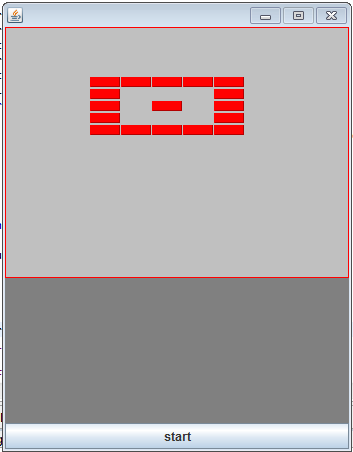
Arraigning Bricks In Our Game

Arrange-Bricks


import java.awt.BorderLayout;
import java.awt.Color;
import java.awt.Graphics;
import java.awt.Rectangle;
import java.util.ArrayList;

import javax.swing.JButton;
import javax.swing.JFrame;
import javax.swing.JPanel;

public class Bricks extends JPanel implements Runnable {

 // variables declaration for brick...............................
    //starting position of the bricks
 int brickx = 85;
 int bricky = 50;

 //You can specify length and breadth of the bricks here
 int brickBreadth = 50;
 int brickHeight = 40;
 // variables declaration for brick...............................
 // ===============================================================

 private static final String[] LEVELS_ONE = new String[] {
  "WWWWW",
  "W   W",
  "W W W",
  "W   W",
  "WWWWW"
  };
 private static final String[] LEVELS_TWO = new String[] {
  "WWWWW",
  "     ",
  "W W W",
  "     ",
  "WWWWW"
  };

 ArrayList<Rectangle> Brick = new ArrayList<Rectangle>();
 Thread t;

 Bricks() {

  setFocusable(true);
  t = new Thread(this);
  t.start();
 }

 public static void main(String[] args) {
  JFrame frame = new JFrame();
  Bricks game = new Bricks();
  JButton restart = new JButton("start");
  // JLabel lbl_startGame = new JLabel("Start Game", JLabel.LEFT);

  frame.setSize(350, 450);
  frame.setDefaultCloseOperation(JFrame.EXIT_ON_CLOSE);

  frame.add(game);

  frame.add(restart, BorderLayout.SOUTH);
  frame.setLocationRelativeTo(null);
  frame.setResizable(false);
  frame.setVisible(true);

 }

 public void paint(Graphics g) {
  g.setColor(Color.LIGHT_GRAY);
  g.fillRect(0, 0, 350, 450);
  g.setColor(Color.blue);

  g.setColor(Color.green);
  g.setColor(Color.GRAY);
  g.fillRect(0, 251, 450, 200);
  g.setColor(Color.red);
  g.drawRect(0, 0, 343, 250);
  for (int i = 0; i < Brick.size(); i++) {
   if (Brick.get(i) != null) {
    g.fill3DRect(Brick.get(i).x, Brick.get(i).y,
      Brick.get(i).width, Brick.get(i).height, true);
   }
  }

 }

 int brickscount;

 public void run() {

  int xaxis = brickx;
  int yaxis = bricky;

  for (int row = 0; row < LEVELS_ONE.length; row++) {
   for (int col = 0; col < LEVELS_ONE[row].length(); col++) {

    if (LEVELS_ONE[row].charAt(col) == 'W') {

     Brick.add(new Rectangle(xaxis, yaxis, brickBreadth, brickHeight));
     xaxis += (brickBreadth+1);

    }
    if (LEVELS_ONE[row].charAt(col) == ' ') {
     xaxis += (brickBreadth+1);

    }

   }
   yaxis += (brickHeight+2);
   xaxis = brickx;
  }

 }// while loop ends here

}

Click here for Breaking Bricks Game Code

Also see Bullet shooting game using Java.

19 February 2014

Program to display all prime number below a user entered number

Create a new Class with name Disp_primes:

import java.util.Scanner;

public class Disp_primes {

    public static void main(String[] args) {
        // TODO Auto-generated method stub
       
        Scanner sc = new Scanner(System.in);
        System.out.println("Enter a number : ");
        int num = sc.nextInt();
        System.out.println("prime numbers below "+num+" are :");
        int rem=0;
        if(num==2){
            System.out.print(num+" is even prime");
        }
        else{
            for(int i=num;i>2;i--){
                int count=2;
        while(count<i){
            rem = i%count;
            if(rem==0)
                break;
            else
                count++;
                    }
        if(rem!=0)
            System.out.print(i+",");
        }
            if(num>2){
                System.out.print("2");
            }
        }
    }

}

Output:(Click on image to enlarge):
Program-to-display-all-prime-number-below-a-user-entered-number-output
(Comment if you have any doubts)
>

Program to check if a number is Prime or not

Create a new Class with name Chk_prime :

import java.util.Scanner;
 

public class Chk_prime {

    public static void main(String[] args) {
        // TODO Auto-generated method stub
        int rem=0,i=2;
        Scanner sc = new Scanner(System.in);
        System.out.println("Enter a number to check if it is prime : ");
        int num = sc.nextInt();
        System.out.println("You entered : "+num);
        if(num==2){
            System.out.print(num+" is even prime");
        }
        else{
        while(i<num){
            rem = num%i;
            if(rem==0){
                System.out.print(num+" is not prime");
            break;}
            else
                i++;
                    }
        if(rem!=0)
            System.out.print(num+" is prime");
        }
        }
    }


Output:(Click on image to enlarge)
Program-to-check-if-a number-is-Prime-or-not-output
(Comment if you have any doubts)

Program to check if a year is leap year or not

Create a new class with name Chk_leapyear: 

import java.util.Scanner;

public class Chk_leapyear {
   
    public static void main(String[] args) {
        // TODO Auto-generated method stub
       
        Scanner sc = new Scanner(System.in);
        System.out.println("Enter a year to check if it is leap year : ");
        int year = sc.nextInt();
        System.out.println("You entered : "+year);
        if(year%100==0){
            if(year%400==0)
                System.out.println(year+" is a leap year");
            else
                System.out.println(year+" is not a leap year");
        }
        else{
            if(year%4==0)
                System.out.println(year+" is a leap year");
            else
                System.out.println(year+" is not a leap year");
        }
    }

}

Output:(Click on image to enlarge)

Program-to-check-if-a-year-is-leap-year-or-not-output
Enter the year you want to check in the output window as shown above.
(Comment if you have any doubts)

First Java program

A demo file to initialize and display different variables:

  • Create a new class with name VariablesDemo:
public class VariablesDemo {

    public static void main(String[] args) {
   
        /* Declaration of variables  */
         int Id;
         String name;
         char gender;
         double salary;
    
         /* Initialization of variables*/
         Id = 4348;
         name = "Employer";
         gender ='M';
         salary = 25000.0;
    
        /* Display the employee details */
         System.out.println("Id : "+ Id);
         System.out.println("Name : "+ name);
         System.out.println("Gender : "+ gender);
         System.out.println("Salary : "+ salary);

        }
}
NOTE: 
  • The text between "/* " and "*/" will not be executed.They are used to write comments.
  • For single line comments use "//" 
 Output:(Click on the image to enlarge)
eclipse-output

Demonstration of Continue statement

Create a new class with name ControlContinue:

class ControlContinue {
    public static void main(String args[]) {
        //boolean bool = true;
        for (int i = 0; i < 5; i++) {
            for (int j = 0; j < 10; j++) {
                System.out.print(j + "\t");
                if (j > 5) {
                    System.out.println();
                    continue;
                }
            }
            System.out.println("Outer Loop");
        }
        System.out.println("End");
    }
}

Output:(Click on the image to enlarge)
Demonstration of Continue statement-output

Demonstration of break statement

create a class with name Control:

class Control {
    public static void main(String args[]) {
        for (int i = 0; i < 5; i++) {
            for (int j = 0; j < 10; j++) {
                System.out.print(j + "\t");
                if (j > 5) {
                    break;
                }
            }
            System.out.println("Outer Loop :"+(i+1));
        }
        System.out.println("End");
    }
}

Output: (Click on the image to enlarge)
Demonstration-of-break-statement-output

Program to print Fibonacci numbers below 'n'

Create a new Class with name Fibonacci:

import java.io.*;
class Fibonacci {
    public static void main(String args[]) throws IOException {
        BufferedReader br = new BufferedReader(new InputStreamReader(System.in));
        System.out.println("enter the value n");
        int n = Integer.parseInt(br.readLine());
        int a = 0, b = 1, c = 0;
        if (n > 0) {
            System.out.println("---------------------");
            System.out.println("\t" + a);
            System.out.println("\t" + b);
            do {
                c = a + b;
                if(c<=n)
                System.out.println("\t" + c);
                a = b;
                b = c;
            } while (c <= n);
            System.out.println("---------------------");
        } else {
            System.out.println("enter positive n value");
        }
    }
}


Output:(Click on image to enlarge):
Program-to-print-Fibonacci-numbers-output
Comment if you have any doubts.


06 December 2012

Brick Breaker java game source code


Brickbreaker-game


import java.awt.BorderLayout;
import java.awt.Color;
import java.awt.Dimension;
import java.awt.Font;
import java.awt.Graphics;
import java.awt.Rectangle;
import java.awt.event.ActionEvent;
import java.awt.event.ActionListener;
import java.awt.event.KeyEvent;
import java.awt.event.KeyListener;

import javax.swing.JButton;
import javax.swing.JFrame;
import javax.swing.JPanel;

public class BrickBreaker extends JPanel implements KeyListener, ActionListener, Runnable {
private static final long serialVersionUID = 1L;
// movement keys..
private static boolean right = false;
private static boolean left = false;

private static final int brickBreadth = 30;
private static final int brickHeight = 20;
// variables declaration for brick...............................
// ===============================================================
// declaring ball, paddle,bricks
private Rectangle Ball;//
private Rectangle Bat;//
private Rectangle[] Brick;
private Rectangle background = new Rectangle(0, 0, 350, 450);

//reverses......==>
private int movex = -1;
private int movey = -1;
private boolean ballFallDown = false;
private boolean bricksOver = false;
private int count = 0;
private String status;
private JButton button;

private static enum STATUS {
START, PAUSE, RESUME, STOP
}

private static boolean PAUSE = false;
private static boolean RUNNING = false;

BrickBreaker() {
initializeVariables();
JFrame frame = new JFrame();
button = new JButton(STATUS.START.name());
frame.setDefaultCloseOperation(JFrame.EXIT_ON_CLOSE);

// using this as parent layout exists (JFrame)
this.setPreferredSize(new Dimension(background.width, background.height));
frame.getContentPane().add(this);
frame.pack();

frame.add(button, BorderLayout.SOUTH);
// frame.setLocationRelativeTo(null);
// frame.setResizable(false);
frame.setVisible(true);

button.addActionListener(this);

this.addKeyListener(this);
this.setFocusable(true);
}

public static void main(String[] args) {
new BrickBreaker();

}

// declaring ball, paddle,bricks

public void paint(Graphics g) {
g.setColor(Color.LIGHT_GRAY);
g.fillRect(background.x, background.y, background.width, background.height);
g.setColor(Color.blue);
g.fillOval(Ball.x, Ball.y, Ball.width, Ball.height);
g.setColor(Color.green);
g.fill3DRect(Bat.x, Bat.y, Bat.width, Bat.height, true);

// this will paint below the peddle
g.setColor(Color.GRAY);
g.fillRect(0, 251, background.width, 200);

// this will draw border line
g.setColor(Color.RED);
g.drawRect(0, 0, background.width - 1, 250);
for (int i = 0; i < Brick.length; i++) {
if (Brick[i] != null) {
g.fill3DRect(Brick[i].x, Brick[i].y, Brick[i].width, Brick[i].height, true);
}
}

if (ballFallDown == true || bricksOver == true) {
Font f = new Font("Arial", Font.BOLD, 20);
g.setFont(f);
g.drawString(status, 70, 120);
ballFallDown = false;
bricksOver = false;
}

}

// /...Game Loop

public void run() {

// == ball reverses when touches the brick=======
//ballFallDown == false && bricksOver == false
while (RUNNING) {
if (PAUSE) {
sleep();
continue;
}

//   if(gameOver == true){return;}
for (int i = 0; i < Brick.length; i++) {
if (Brick[i] != null) {
if (Brick[i].intersects(Ball)) {
Brick[i] = null;
// movex = -movex;
movey = -movey;
count++;
} // end of 2nd if..
} // end of 1st if..
} // end of for loop..

// /////////// =================================

if (count == Brick.length) {// check if ball hits all bricks
bricksOver = true;
status = "YOU WON THE GAME";
repaint();
}
// /////////// =================================
repaint();
Ball.x += movex;
Ball.y += movey;

if (left == true) {

Bat.x -= 3;
right = false;
}
if (right == true) {
Bat.x += 3;
left = false;
}
if (Bat.x <= 4) {
Bat.x = 4;
} else if (Bat.x >= 298) {
Bat.x = 298;
}
// /===== Ball reverses when strikes the bat
if (Ball.intersects(Bat)) {
movey = -movey;
// if(Ball.y + Ball.width >=Bat.y)
}
// //=====================================
// ....ball reverses when touches left and right boundary
if (Ball.x <= 0 || background.width - Ball.width <= Ball.x) {
movex = -movex;
} // if ends here
if (Ball.y <= 0) {// ////////////////|| bally + Ball.height >= 250
movey = -movey;
} // if ends here.....
if (Ball.y >= 250) {// when ball falls below bat game is over...
ballFallDown = true;
status = "YOU LOST THE GAME";
repaint();
button.setText(STATUS.START.toString());
break;
}

sleep();
} // while loop ends here

}
private void sleep() {
try {
Thread.sleep(10);
} catch (Exception ex) {
} // try catch ends here
}

// loop ends here

// ///////..... HANDLING KEY EVENTS................//
@Override
public void keyPressed(KeyEvent e) {
int keyCode = e.getKeyCode();
if (keyCode == KeyEvent.VK_LEFT) {
left = true;
// System.out.print("left");
}

if (keyCode == KeyEvent.VK_RIGHT) {
right = true;
// System.out.print("right");
}
}

@Override
public void keyReleased(KeyEvent e) {
int keyCode = e.getKeyCode();
if (keyCode == KeyEvent.VK_LEFT) {
left = false;
}

if (keyCode == KeyEvent.VK_RIGHT) {
right = false;
}
}

@Override
public void keyTyped(KeyEvent arg0) {

}

@Override
public void actionPerformed(ActionEvent e) {
String str = e.getActionCommand();
if (str.equals(STATUS.START.toString())) {
button.setText(STATUS.PAUSE.toString());
this.startGame();
}
if (str.equals(STATUS.PAUSE.toString())) {
PAUSE = true;
button.setText(STATUS.RESUME.toString());
}
if (str.equals(STATUS.RESUME.toString())) {
PAUSE = false;
button.setText(STATUS.PAUSE.toString());
}

// if (str.equals(STATUS.STOP.toString())) {
// RUNNING = false;
// button.setText(STATUS.START.toString());
// }

}

public void startGame() {
requestFocus(true);
initializeVariables();
Thread t = new Thread(this);
t.start();
}

public void initializeVariables() {
// default size of a brick...............................
int brickx = 70;
int bricky = 50;
RUNNING = true;
// x = 160, y = 218, width = 5, height = 5
Ball = new Rectangle(160, 218, 5, 5);
// x = 160, y = 245, width = 40, height = 5

Bat = new Rectangle(160, 245, 40, 5);

Brick = new Rectangle[12];
// //////////// =====Creating bricks for the game===>.....
createBricks(brickx, bricky);
// ===========BRICKS created for the game new ready to use===
movex = -1;
movey = -1;
ballFallDown = false;
bricksOver = false;
count = 0;
status = null;

}

public void createBricks(int brickx, int bricky) {
// //////////// =====Creating bricks for the game===>.....
/*
* creating bricks again because this for loop is out of while loop in run
* method
*/
for (int i = 0; i < Brick.length; i++) {
Brick[i] = new Rectangle(brickx, bricky, brickBreadth, brickHeight);
if (i == 5) {
brickx = 70;
bricky = (bricky + brickHeight + 2);

}
if (i == 9) {
brickx = 100;
bricky = (bricky + brickHeight + 2);

}
brickx += (brickBreadth + 1);
}
}

}

Help improve my way to approach you by commenting. PLZ do comment.
Thank you.

 How To Arrainge Bricks In Game

GitHub Link

Contact Form

Name

Email *

Message *

Smooth Graphics Java

// Arrange Bricks in Game //java brick breaker game code without flickering // added game levels 1,2,3 in the game //java paddle ball ga...